Thursday, January 6, 2011

Architects and Engineers rejoice! X Construction will put your skills to the test


Recently, Google made news when the Android Market hit the 200,000 mark. I've been following Android for quite sometime now and I've seen quite a few interesting apps. One of the newer apps is a game that was just recently released. This game takes London Bridges to a whole different level. Although quite simple, it is entertaining with a hint of difficulty. I'm sure this game will encourage Android lovers to get their build on.


X Construction Lite by CrossConstruct is a game where you build a bridge over a valley to help the train get to the other side. Yes it sounds painfully simple but there's a catch. One needs to take into consideration the weight of the train since it can cause structural stress. You are also given a limited amount of girders to build with. Finding the right foundation for building the bridge can be quite difficult (well for me at least since I'm not an architect lol).

Choo choo!!
Red girders mean structural stress
Overall, I find this game to be quite addicting. The graphics look quite appealing and the sound effects are a nice addition. People scream for their lives if the bridge breaks from a poorly constructed foundation. The physics in this game is interesting. I find it quite amusing how the bridge's parts "pop" and rip through the air. There is an "Undo" button so if you used one too many girders, you can click undo to re-tweak your bridge. Some levels can be very challenging and it really gets your mind working. One level in particular racked my brains out when I trying to find a solution.

6 challenging levels
This game is in Beta so it is quite short (6 levels to be precise). If I were to guess, since this game is in Beta and this is a "Lite" version, full release Lite and Paid versions will eventually hit the market. The dev definitely has an addictive game that can potentially be quite popular (it already has >250,000 downloads in such a short amount of time). Anyway until then, check out this Beta release on the Android Market. It doesn't hurt to try especially since it's FREE!!


Friday, December 31, 2010

Game and Watch: Parachute for Android (No longer on Market)


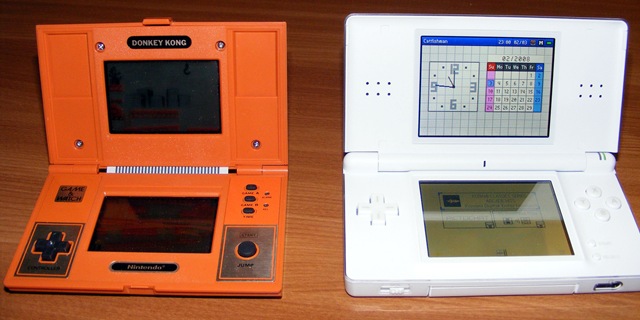
If you were a gamer during the 1980's, you'd probably know about Nintendo's Game and Watch handhelds. It was one of the marvelous handhelds created by the late Gunpei Yokoi (created the original Game Boy). One of the cool things about this handheld is the fact it is a game with the function of a watch (hence Game and Watch). Many of these games were later ported to various Nintendo consoles but the beauty of it lies within the original handheld. You can definitely see the resemblance found in the Nintendo DS.

Original G&W on the left, DS on the right 
Interestingly, a developer (sorry I can't remember the name of the dev from the top of my head) created one of the many Game and Watch games for Android. The game is called Parachute. You're a person in a rowboat trying to catch parachuters from a helicopter. If you miss, they'll fall into the water only to be eaten by a shark. The object of the game is to save as many parachuters as possible.


Overall, it's a short sweet game. It has two modes along with a watch mode. The game can be a bit cumbersome as it gets quite difficult (my highest score was 22). The sound is reminiscent of the 8-bit gaming era. The skin definitely brings some nostalgia since it is designed after the original Nintendo Wide Screen series.


Sadly this game was taken off the Android market possibly to prevent a lawsuit from Nintendo. I have the .apk if anyone is interested. Thought I'd share some of the nostalgia with anyone who is interested. Just leave a comment. =)

Wednesday, December 29, 2010

Screen Filter: An adjustable nightshade for your phone

Do you find your phone's screen to be too bright at night?
Do you happen to use a brightness control app yet find it inadequate? 
Do you find your phone's battery dying quickly due to it's display?

If you answered yes to any of those questions, I found an app that will adjust the brightness of your phone while helping you save some battery life in the process. (Wow I sound like a crummy salesman haha ><) I'm willing to bet many Android users surf the net or play games while in the dark. The brightness of the screen is quite irritating and overpowering to some. One solution is to use a brightness adjustment app. Using such an app has a drawback. Many brightness adjustment apps on the Android Market only adjust the brightness down to 10%. Yes, 10% sounds low but even at low brightness, the screen is still blinding in the dark. Staring at such brightness may damage your eyes in the long run.

Normal
Now without further ado, here is the solution to prevent your phone from burning holes in your eyes. This app is known as Screen Filter by Haxor Industry. This helpful app applies a nightshade to your phone thus dramatically reducing screen brightness. Unlike other apps, the developer claims Screen Filter uses a logarithmic scale to adjust brightness which allows for fine-grain control.  This creates a tint rather than just adjusting the brightness of the screen which does not hinder legibility.

46.7% Setting (dark)
41.6% setting (darker)
If you click the app in the notification bar, it'll toggle settings
Some of the features found in this app are:
-Tasker/Locale plug-ins (this allows the ability to automate your phone using Tasker or Locale)
-Toggle on/off ability (If you put a shortcut icon on your desktop, you can use the icon to toggle on/off)
-Confirms very low brightness settings (Nifty feature so you don't accidentally make your screen too dark)

One of my favorite features found in this app is the ability to turn off the soft-key backlight. The softkeys are your hardware buttons which glow in low light due to the ambient sensor. Sometimes even these softkeys can be quite bright so it's nice to have an option to turn it off. It works great on my phone (HTC Aria) but the developer mentioned it doesn't work on all phones.


Filter adjustment and ability to disable softkey backlight
Overall this is a very nice app. I've been using it for about a month. I've noticed my battery life lasts a little longer since using this app. I'm not sure if it's a placebo effect but I'm guessing since the screen isn't pumping out as much juice, some battery life is spared. There are a few bugs but it's to be expected from a work in progress. I noticed on a few occasions where the app would revert back to normal settings. It's not a big deal as you can re-enable it. The developer is quite prompt with updates so many bugs have been ironed out.

Check out this great app. It's FREE on the Android Market. Perhaps you'll save some battery life and help prevent damage to your eyes in the process.